

Formula Finder for Revit: Paul Aubin Builds a Parametric Family With a Physical Dial

On Thursday I hosted a TRXL Feature Spotlight with Paul Aubin. This one was a show and tell: Paul brought the Formula Finder, a physical rotating dial that puts the right-triangle and circle formulas you need in the Revit Family Editor in front of you, already written in Revit syntax.
Paul has spent around four decades in AEC, writes Revit books, consults for architecture firms, is a LinkedIn Learning author, and recently joined the Nova by Vireo training platform. I used to teach Revit out of one of Paul's books, so this was a treat. The Formula Finder is on Kickstarter now, so you can't buy it yet. The campaign ends Tuesday morning, November 24, and it's all or nothing.
Jump to a section
0:00 Welcome and intro
2:38 What the Formula Finder is
4:07 First look at the dial
5:50 Why an analog tool in the age of AI
8:27 From a Renaissance Revit cheat sheet to prototypes
11:51 Sketching it yourself vs. asking AI
18:01 The coffered ceiling problem
20:11 Live in Revit: the revolve family
23:33 Circle Solver: the sagitta formula
28:58 Triangle Solver: start and end angles
33:32 Flexing the radius
41:17 Voids, molding sweep and rosette
47:07 Loading it into a curtain panel
55:16 What working it out yourself gives you
1:01:22 Kickstarter tiers and wrap
What the Formula Finder is
One side is a Triangle Solver, the other a Circle Solver. Turn the dial to the two values you know and windows show the formulas that connect them, already in Revit syntax. Paul's backers call it a ductilator for Revit.
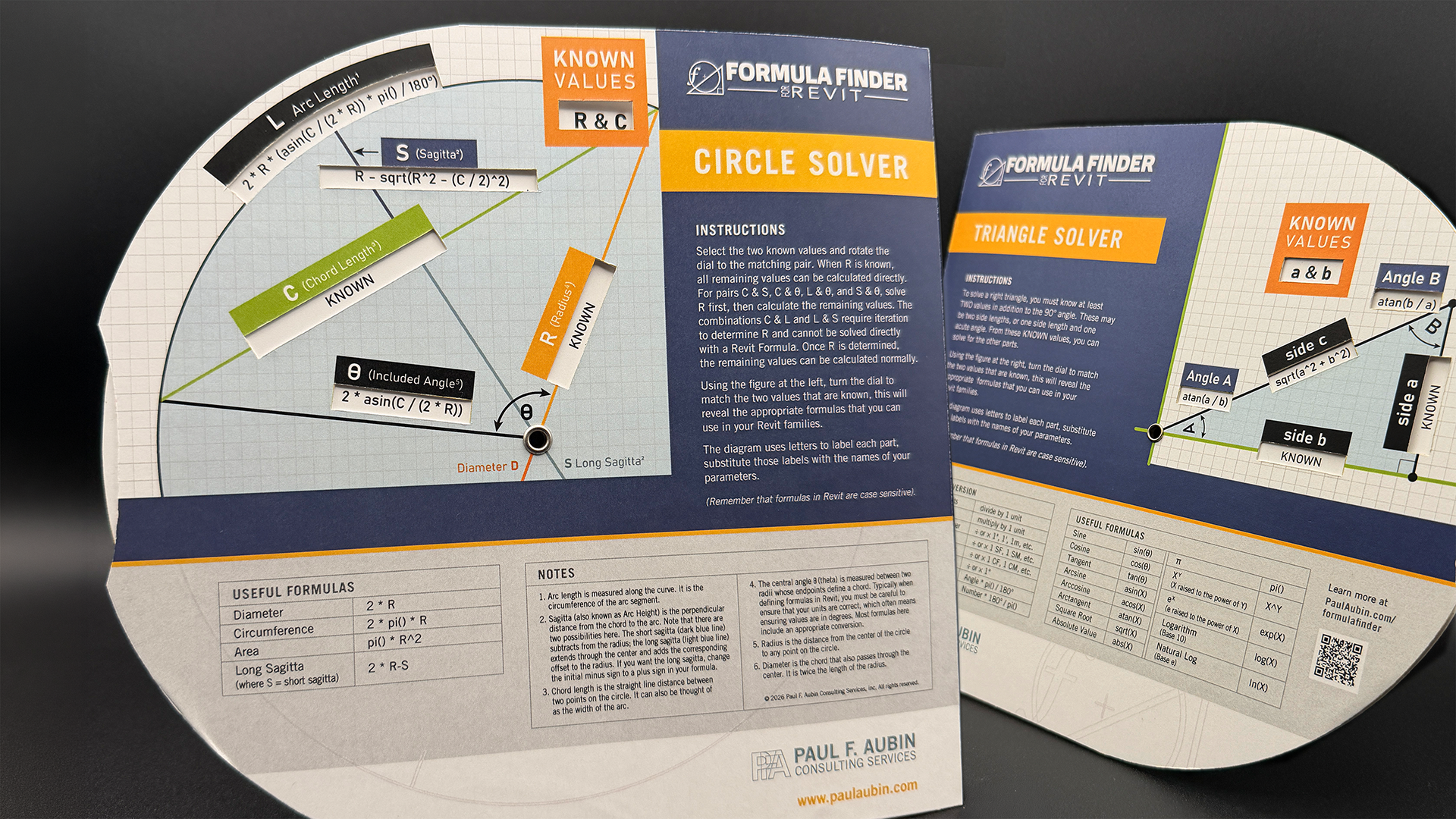
Anyone who builds parametric families knows the routine. SOH-CAH-TOA gets you the math, then you translate it into parentheses, carets and SQRT, so you Google it or dig through a binder. The Formula Finder started as a cheat-sheet page in Renaissance Revit. It became a dial, and a circle side got added when putting the triangle inside a circle opened up the arc and radius formulas needed for barrel vaults and arched windows. A manufacturer in the Chicago suburbs made the prototype shown on camera.
Why an analog tool in an AI world
I asked what a lot of people are probably thinking: why not ask AI? Paul's answer was both/and. AI gets used constantly, but a chat means another tab and a history of quick questions nobody needed to keep. A formula from AI is only checkable if you already know the territory.
Paul still sketches the triangle on paper first. Redrawing is how the problem gets internalized, and how the result gets explained to a client later. I liked Paul's line about site visits: laser scans give you every measurement, but did you really see the building?
My own addition: when I work digitally, a quick lookup turns into email and Teams. A dial next to the keyboard keeps you in the zone.
The demo: a curved coffered ceiling panel
Paul built a curved parametric curtain wall panel for a coffered barrel-vault ceiling, live. A curtain system gives you flat, square panels, and the goal was panels that follow the curve of the vault. The known values were the radius and the chord length. The unknown was the sagitta, the rise of the arc. Never heard some of these terms before? Me either, and I even enjoyed my trig and geometry courses.
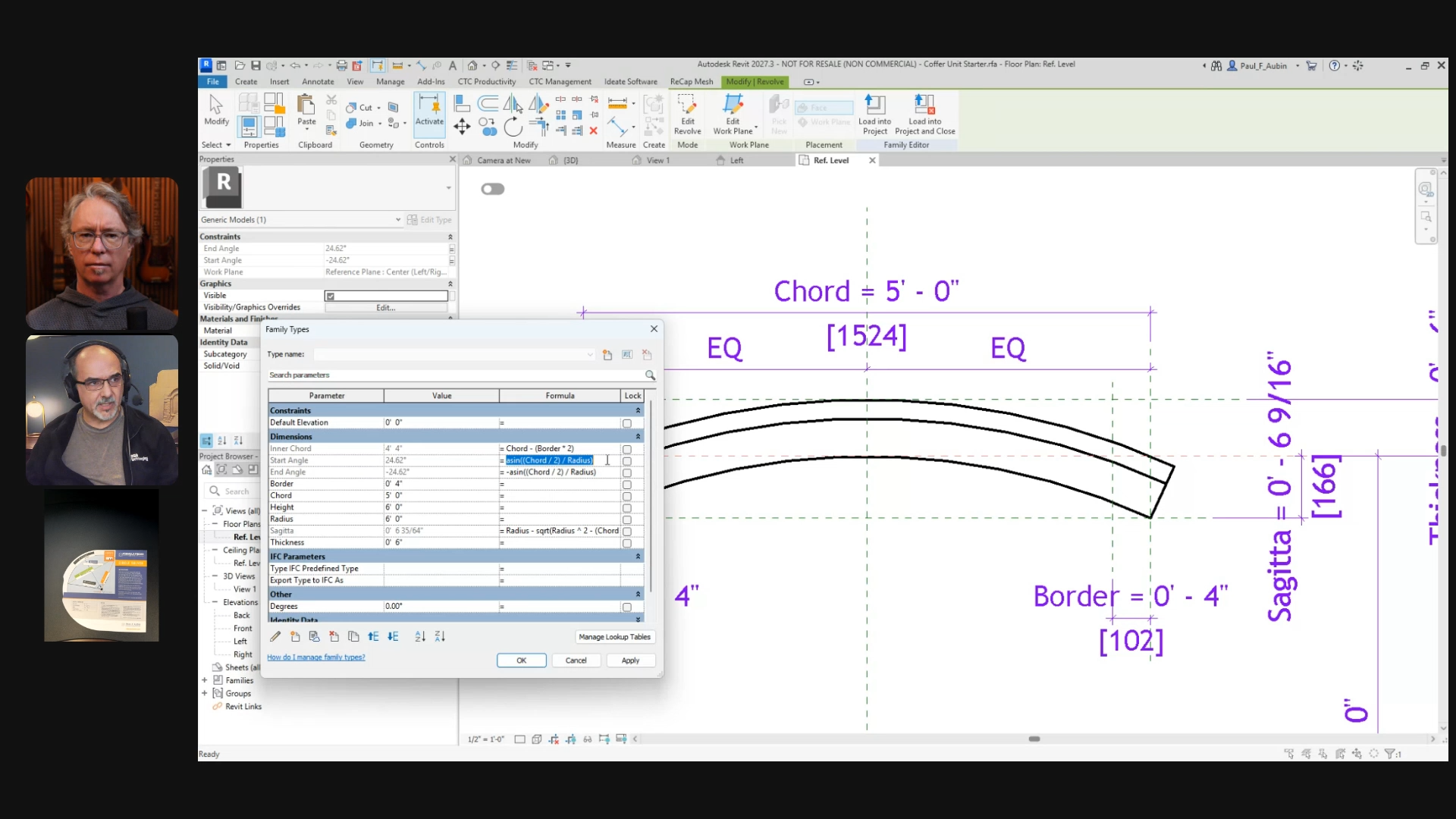
The Circle Solver gave the sagitta formula, which went into Family Types nearly as printed. The Triangle Solver gave the start and end angles for the revolve. The arc then fit the reference planes at all three points, and flexing the radius from four feet to five updated everything.
Paul then loaded the family into a curtain panel tied to a global parameter. Changing the vault radius from 12.5 to 14 feet updated every panel. A missing radius parameter in the nested family caused a live-demo wobble. I said that's what the format is for.
A few practical notes:
- It needs no battery and doesn't hallucinate.
- It doesn't consume tokens, increase your AI spend, or cost you another subscription fee.
- It won't run Revit for you or fix a family that misbehaves, though it may show why.
Watch it, then back it
The replay has the full build and Paul's reasoning for working problems by hand. It's worth the hour if you build families or teach people who do.
The Kickstarter funding goal is $7,500. When we went live, Paul had 86 backers and the campaign was about two-thirds funded. Tiers run from $15 early-bird singles and a signed, numbered edition to team and classroom packs. The top two add a Family Editor workshop for your team, 90 minutes or three hours. Manufacturing won't finish before the holidays, so every backer gets a printable PDF to gift in the meantime.
If you've learned something from Paul over the years, this is a good time to pay it back. Thank you, Paul, for the demo and for everything you've done for the Revit community over the years.